

The DVR EVO Professional Language Lab is an optional software module for the Easy School Net Evolution educational network.
The DVR (Digital Video Recorder), an audio-video language-authoring module, transforms standard PCs, laptops, and tablets into a highly professional language lab suitable for language study at universities or in environments requiring maximum audio and video performance. Download the manual for more information.
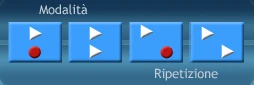
DIGITAL VIDEO RECORDER DVR is the first multimedia language lab designed to replace traditional recording systems in language labs. The DVR has replaced the traditional cassette recorder or more modern digital hardware recorders. It offers many additional features compared to the traditional hardware language lab for independent language instruction and learning. Combining pronunciation practice, video presentations, audio discussions, and exercises, the DVR creates a simple and, above all, interactive teaching and learning environment. The DVR Language Module provides all the functions of traditional hardware systems, plus a set of unique advanced features such as simultaneous audio and video recording from DVD, VHS, TV, or video camera input, the insertion of tests taught simultaneously with the audio or audio + video input, and interactive chat.
The DVR Language Module boasts a twenty-year history of supplying language labs, with approximately 4,000 installations in Italy and approximately 13,000 classrooms worldwide. Over the years, teachers have been able to inform the manufacturer of the features and technical specifications needed to create a truly useful and helpful product for language teaching. This is thanks to the ongoing feedback from language teaching experts. We thank all the teachers and everyone who has collaborated with us, making the DVR language module a product among the best in the world.
The excellent quality of the audio-video signals, combined with the DVR's countless innovative features—for example, simultaneous video and dual-track audio recording, which can be performed in eight different modes at the teacher's discretion—and the distribution of language lesson-related tests have made the DVR language module the Digital Language Laboratory that was awarded the Hardware Award at the BETT international education fair held in London, which recognized the excellent quality of both the teaching system and the excellent audio quality.
HOW TO USE
The DVR language module operates in two different modes:
- TEACHING MODE
- SELF-LEARNING MODE
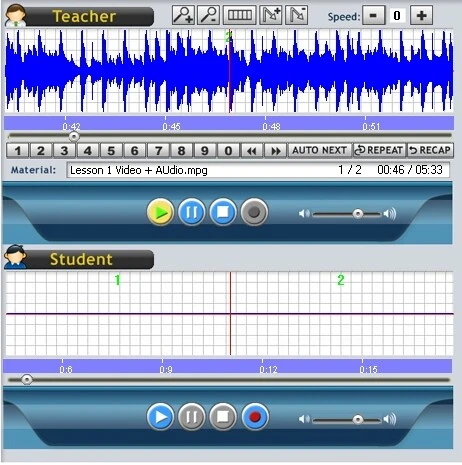
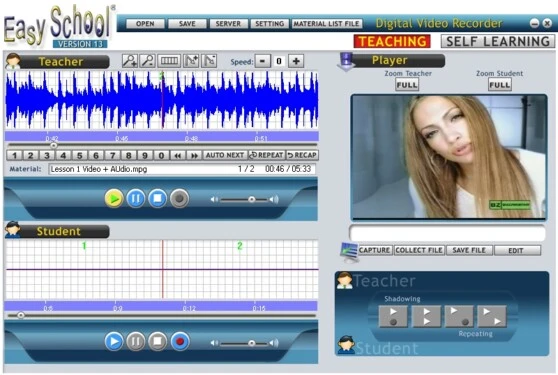
The Easy School DVR language module has two distinct and separate audio channels or tracks, both for recording and for independent playback, with proprietary volumes and the option of mixing the two tracks being listened to. Both tracks also feature graphs that illustrate the audio tracks in detail with histograms, facilitating language learning. The two independent audio tracks can also be broken down or divided into paragraphs as desired by the teacher or even by the students, if permitted by the teacher, using the bookmark function. Digital Video Recorder Laboratory (DVR) guarantees the transmission, using the LAN network without additional hardware, of audio and video in very high digital and stereo quality, without delays and with a maximum 2% consumption on the network, even when transmitting video and audio sources such as DVD, VHS, TV or other external devices in full screen to up to 120 PCs simultaneously. Thanks to the optional Multimedia Channel Module, it will be possible to send up to 4 different external Audio Video sources simultaneously and the 12 Digital Audio-Video Module for sending DVDs, CDs and multimedia films simultaneously.
Sending audio-video multimedia sources will no longer be a problem thanks to the ease of use of Easy School Evolution DVR 15.0. Sending any audio-video content is easily possible without the need to "digitize" the content.
The Easy School Language Module features advanced group and subgroup communication that can be easily customized by the teacher. All Language Module functions have excellent stereo audio quality, without delays and/or background noise typical of hardware-based labs.
The DVR features an Auto-Collect function, allowing it to collect student recordings for later review of pronunciations.
The new graphical interface makes the Language Module easy and quick to use for teachers.
The new Evolution DVR EVO version has paid particular attention to the Professional Digital Video Recorder Language Module, now in its thirteenth edition, offering the best in educational technology applied to language learning.
You'll be amazed by the fluidity of the video (even when captured from external sources such as DVD, VHS, or TV) and the perfection of the stereo audio. The controls of the new graphical interface have been specifically designed for use in classroom environments and are extremely simple to use while also offering a wealth of innovative features.
Digital Video Recorder DVR EVO is a professional multimedia language lab designed to replace the traditional tape recording system in language labs, which has long been considered obsolete. The DVR has replaced the traditional cassette recorder or more modern digital hardware recorders, offering additional functions compared to the classic hardware language lab for independent language instruction and learning, such as pronunciation practice, video presentations, audio discussions, and exercises. The DVR creates a simple and, above all, interactive teaching and learning environment. The DVR Language Module provides all the functions of standard current hardware systems, plus a set of unique advanced features such as simultaneous audio and video recording from DVD, VHS, TV, or video camera input, or the insertion of tests with the Ex@m module, taught simultaneously with the sending of the audio or audio + video source, or interactive chat.
Language Functions:
· Create audio + video project files containing simultaneously recorded information.
. Possibility of sending 4 video + audio sources simultaneously with the 4AV Module
· Simultaneous audio and video recording from DVD, VHS, TV, or video camera input
. Active controls on the Teacher Station to the Student Station
· Teaching Mode Switch
· Master Track Volume Control
· Student Track Volume Control from the Master Station
· Sensor that detects the start of pronunciation and consequently starts recording in stereo with digital quality.
· Bookmark Editor
· Adding a Bookmark
· Deleting a Bookmark
· Editing a Bookmark
· Zoom in / out Audio Graphics Progress
· Audio and Video Speed Control
· Recap Function
· Loop Function
· Auto-Next
· Auto-Collect recording of student tracks
· Quiz
· Additional captions while watching or transmitting the video
· Chat linked to the audio track or independently.
The Language Module interacts with the CHAT while listening to the audio track, with the option of adding additional captions while the audio track is playing (for example, the option of adding a translation or a question).